- Translate English to Chinese
- Translate Chinese to English
- Pinyin input
- Chinese character input
Showing posts with label utility. Show all posts
Showing posts with label utility. Show all posts
Friday, 25 September 2009
nciku Chinese English Dictionary
I accidentally stumbled upon a new Online Chinese English Dictionary application today. This is by far the best online Chinese English dictionary for people like myself, where we learnt Chinese as a 2nd language.
www.nciku.com
So what is so special about this dictionary as compared to the others? These are 2 reasons:
*****
1. In other dictionaries, you have to "switch modes" if you want to:


Wednesday, 19 September 2007
Libra
I discovered this gem of a utility yesterday night. It is something I have been looking out for in quite a while, and I am simply astonished that this particular version I found can be so full featured - and FREE!
If you have a considerable collection of books (as I do), and you have been thinking of cataloguing them inside a personal electronic database, but you never got around to doing it because you simply don't have the time to input all those information into the computer, then Libra could just be the program you have been waiting for.
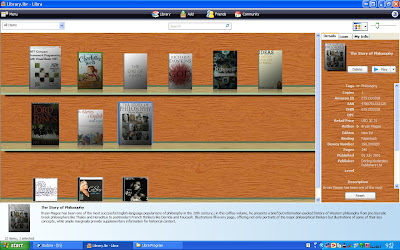
The "smarts" of the Libra program is that instead of entering all the voluminous book details of each book (book title, author, synopsis etc), you enter just the ISBN number (a 10 digit or 13 digit number that uniquely identifies every publication) into the program. Libra uses the ISBN number to cull all the nitty-gritty details of the book from the Amazon.com database, and transfers this information into your own personal database! Because Libra will also pull the book jacket image from Amazon, your book collection is presented in a very pleasing fashion as the following screen capture will attest:
 http://picasaweb.google.co.uk/njwong88/Libra/photo#5111727272205672498
As you can see from the image, Libra can also catalogue music CDs (the 3 titles on the bottom shelf). Libra can also catalogue video DVDs. (The titles in the screen capture are some books/music in my personal collection. You can click the "View largest photo" link to see the book/CD titles more clearly if you want to know what I have been reading during the past few months )
The program is dirt easy to use and requires no tutorial. And despite its already outstanding feature set, the author has even included a feature which allows you to use your webcam to "scan" the ISBN barcode instead of typing in the 10-digit (or 13-digit) number manually. However, I couldn't test this capability as I don't own a webcam (currently).
Amazingly, this program is developed by a Singaporean company (CodeJam Pte Ltd at Noel Building in Playfair Road). It is sad that instead of reading about this amazing-amazing software from this local company from our veritable Straits Times, I have to learn about it from an American
You can download Libra (and read a much better sales pitch of it) from here:
http://www.getlibra.com/
Remember to click the "About Us" link to read the authors' humorous description about themselves...
http://picasaweb.google.co.uk/njwong88/Libra/photo#5111727272205672498
As you can see from the image, Libra can also catalogue music CDs (the 3 titles on the bottom shelf). Libra can also catalogue video DVDs. (The titles in the screen capture are some books/music in my personal collection. You can click the "View largest photo" link to see the book/CD titles more clearly if you want to know what I have been reading during the past few months )
The program is dirt easy to use and requires no tutorial. And despite its already outstanding feature set, the author has even included a feature which allows you to use your webcam to "scan" the ISBN barcode instead of typing in the 10-digit (or 13-digit) number manually. However, I couldn't test this capability as I don't own a webcam (currently).
Amazingly, this program is developed by a Singaporean company (CodeJam Pte Ltd at Noel Building in Playfair Road). It is sad that instead of reading about this amazing-amazing software from this local company from our veritable Straits Times, I have to learn about it from an American
You can download Libra (and read a much better sales pitch of it) from here:
http://www.getlibra.com/
Remember to click the "About Us" link to read the authors' humorous description about themselves...
http://picasaweb.google.co.uk/njwong88/Libra/photo#5111727272205672498
As you can see from the image, Libra can also catalogue music CDs (the 3 titles on the bottom shelf). Libra can also catalogue video DVDs. (The titles in the screen capture are some books/music in my personal collection. You can click the "View largest photo" link to see the book/CD titles more clearly if you want to know what I have been reading during the past few months )
The program is dirt easy to use and requires no tutorial. And despite its already outstanding feature set, the author has even included a feature which allows you to use your webcam to "scan" the ISBN barcode instead of typing in the 10-digit (or 13-digit) number manually. However, I couldn't test this capability as I don't own a webcam (currently).
Amazingly, this program is developed by a Singaporean company (CodeJam Pte Ltd at Noel Building in Playfair Road). It is sad that instead of reading about this amazing-amazing software from this local company from our veritable Straits Times, I have to learn about it from an American
You can download Libra (and read a much better sales pitch of it) from here:
http://www.getlibra.com/
Remember to click the "About Us" link to read the authors' humorous description about themselves...
Friday, 22 June 2007
Lingoes
A few years ago (2004), I wrote about the excellent Merriam Webster Online Dictionary (www.m-w.com) . I still find this online dictionary extremely useful today because besides giving you the definition, you can also click on the speaker icon to hear how each word is pronounced.
Try figuring out how to pronounce these words:
- Cheyenne
- Banyan
- Pyrrhic
- Longman Dictionary of Contemporary English
- Oxford Advanced Learners English Dictionary
- Oxford Advanced Learners English-Chinese Dictionary
- Collins COBUILD Advanced Learners English Dictionary
Friday, 30 March 2007
Downloading YouTube videos and converting Multimedia files
I recently upgraded my Singtel account to the Singtel MIO bundle (broadband + mobile phone + fixed line phone for $68 per month). Making this switch netted me physical savings of $4 per month (compared to the $72 total I paid previously for the services separately). Besides being cheaper, I am also getting:
- faster broadband speed (3000 kbps compared to 1500 kbps previously)
- free SMS, free caller ID, and more mobile minutes for outgoing calls (100 minutes compared to 80 minutes)
- - free outgoing fixed line calls (I used to pay 1.4 cents per minute for outgoing calls on my fixed line)
****
When I upgraded to the MIO plan, Singtel said it was mandatory that I get a new mobile phone. After evaluating the offerings available, I finally opted for a $0 phone. For a free phone, I found the Samsung Ultra Edition 8.4 to be feature-packed! You can read a review of the phone and its features at this site:
http://asia.cnet.com/reviews/mobilephones/0,39051199,39271322p,00.htm

As you can see from the CNET magazine review, this phone can play MP3 music and MP4 video files. As I have never owned such multimedia phones before (yup, I am that behind the times in terms of handphone ownership), I got all caught up trying all kinds of MP3 songs from my personal music collection for my ring tone. In the end, I settled on "Sara" (from the Jefferson Starship album "Knee Deep in the Hoopla"), which is one of my favorite songs from the 1980s.
However, I then found the "Sara" music video on YouTube:
http://www.youtube.com/watch?v=ZqRTtkEHrA4
Not content with having "Sara" as my ring tone, I now wanted to also load the "Sara" music video on my Ultra Edition phone.
If you have tried to download YouTube's videos before, you know that you can't actually save YouTube videos on to your hard disk as easily as you can with regular files.
A little investigation told me that all YouTube videos are actually stored in FLV (Flash Video) format. I also found many techniques and utilities for saving YouTube videos as FLV files on the hard disk. However, the method that I am recommending is also the easiest to remember: Just put the word "Kiss" before "YouTube" to get "KissYouTube".
To download a copy of a YouTube video, simply prefix "kiss" before the word "youtube" in the URL. Using the above URL as an example, to download the "Sara" video, all I needed was to type this URL instead in my web browser:
http://www.kissyoutube.com/watch?v=ZqRTtkEHrA4
On the KissYouTube page that is opened, click the link "Download Now" to begin the download. As per the instructions given, you must remember to add the extension ".FLV" to the file name when you save the file on your hard disk.
****
If you want to play FLV files from your PC, I strongly recommend the freeware (and open sourced) media player VLC, which can be downloaded from this site:
A few years ago, I obtained a video in WMV format from a Microsoft CDROM. However, the WMV file on the CDROM was partially corrupted, and Microsoft's Windows Media Player refused to play the corrupted WMV file - complaining that it was bad and not playable etc. The corrupted WMV file will not play on other players like RealPlayer or Quicktime either. As I wanted to watch the video, I discovered references to the VLC program from a Google search. To my astonishment and delight, VLC played the corrupted WMV file without any problems whatsoever. I was sold on the VLC player ever since.
****
However, the Ultra Edition phone cannot play videos in FLV format. To play the "Sara" music video, I need to first convert the FLV file to MP4 format.
I have found a fantastic web site that will convert a file in any media format to any other media format. And yes, the conversion service is free!
In the Media-Convert site, simply specify the source file from your hard disk and its media type. Then, specify the destination type you wish to convert the file to. Click the "Convert" button, and viola! The conversion is done for you. There is no software to be installed, so you can perform these conversions from a Windows, Mac, or even Linux computer!
I converted the "Sara.FLV" file to "Sara.MP4", and uploaded the MP4 file into my phone. I now have the "Sara" music video playing beautifully on my new phone.
Wickedly, the Media-Convert site is also able to convert the FLV video file to an MP3 music file too. Thus, this is also a good way to extract just the audio portion of a video file in to an MP3 file for use as a ring tone!
Hope you find these tips fun and useful. As a bonus, here is another YouTube music video that you might want to "rip" and "collect":
http://www.youtube.com/watch?v=AhAjrIAFiJ0
Enjoy! NJ
Saturday, 4 November 2006
AXIS Gathering with Koon Chee - Friday 03 Nov 2006
So when was the last AXIS gathering? That would be back in 2005 when Monica gave birth to Clara. But at that time, Koon Chee was in Hong Kong. If I am not wrong, the last gathering with Koon Chee was probably the one back in May 2004 at Danny and Monica's house.
However, everyone was plenty busy, so only Danny, Monica and myself could make it for this one. Koon Chee is in Singapore for a whole week to oversee a new project at Fedex (he was here since 28 October, and will tentatively be leaving Singapore on 7 November).
So what is new? ABSOLUTELY NOTHING.
Photo 1
Photo 2
Oh right. Monica is having a second child soon. And I think Koon Chee's glasses are too outlandish (but then, who am I to comment on fashion?).
Koon Chee is staying at the Hotel Phoenix (next to Somerset MRT station on Orchard Road), so he suggested meeting at Kinokuniya Bookstore at Ngee Ann City at 7pm. After meeting up, we decided to dine at the Crystal Jade Kitchen (Cantonese cuisine) restaurant in Basement 2. Although the restaurant has been hyped to the hip on its exquisite food, I personally didn't find the dishes we tried particularly outstanding (and the dishes we chose were all "Chef Recommendations"). I have definitely eaten tastier Cantonese cooking in other restaurants
Restaurant review from the Sunday Times
The restaurant was very packed! With some reluctance, we decided to give up our table at 9 pm to the horde of customers queuing outside the restaurant (waiting for stragglers like us to leave) and made our way to the McDonalds one level up in Basement 1 where we continued our chit chat until 10:15pm. We left because the shopping centre was closing, and security guards everywhere were bringing down the shutters. Otherwise, I think we probably would have stayed longer.
Since we are all in the IT line, talk naturally drifted to Microsoft's Windows Vista. Danny mentioned that Ai Khim is working in a firm that do product packaging for Microsoft. I joked that we should ask Ai Khim to sneak out some of the new Vista packaging as they look very shiny and desirable.
Vista Shiny's Case
Anyway, I did a fun mockup for a software package. Too bad the software cannot duplicate Microsoft's "shiny" look:
VersaTrack Box
VersaTrack Box (Details)
If you wish to try Vista, you can get the Vista download from this site:
http://www.microsoft.com/windowsvista/getready/preview.mspx
Despite what it says on the website, it is my understanding that anyone and everyone can download and try the Vista RC1 (Release Candidate 1) for free. This evaluation version will expire at the end of May 2007 (you have only 7 months to try it).
I have tried Vista RC1 off and on over the past 2 weeks. Personally, Vista feels like a Windows update that is completely focused on "eye candy". It doesn't feel like a compelling upgrade from Windows XP, unlike the update from Windows 98 to Windows XP. When Windows XP was introduced, the rock solid stability of the XP version of Windows was astonishing! (As compared to the multitude of "blue screens of death" I got everyday when I was running Windows 98.)
My recommendation is: don't bother upgrading an existing copy of XP to Vista.
You should only get Vista when you buy your new PC (with Vista preinstalled).
I also told Danny that I am using a free program from Microsoft called Microsoft Virtual PC 2004. Virtual PC allows me to run multiple virtual sessions - with each session running a completely different Windows operating system - on my Windows XP notebook.
My Windows XP notebook running with a Window 2003 Server virtual session.
If you think Virtual PC is useful, you can download it for free from this Microsoft site:
http://www.microsoft.com/windows/virtualpc/default.mspx
***
Anyway, enough of the IT talk. Hopefully, more of us will be able to make it for the next AXIS gathering.
Happy weekend!
NJ
So when was the last AXIS gathering? That would be back in 2005 when Monica gave birth to Clara. But at that time, Koon Chee was in Hong Kong. If I am not wrong, the last gathering with Koon Chee was probably the one back in May 2004 at Danny and Monica's house.
However, everyone was plenty busy, so only Danny, Monica and myself could make it for this one. Koon Chee is in Singapore for a whole week to oversee a new project at Fedex (he was here since 28 October, and will tentatively be leaving Singapore on 7 November).
So what is new? ABSOLUTELY NOTHING.
Photo 1

Photo 2

Oh right. Monica is having a second child soon. And I think Koon Chee's glasses are too outlandish (but then, who am I to comment on fashion?).
Koon Chee is staying at the Hotel Phoenix (next to Somerset MRT station on Orchard Road), so he suggested meeting at Kinokuniya Bookstore at Ngee Ann City at 7pm. After meeting up, we decided to dine at the Crystal Jade Kitchen (Cantonese cuisine) restaurant in Basement 2. Although the restaurant has been hyped to the hip on its exquisite food, I personally didn't find the dishes we tried particularly outstanding (and the dishes we chose were all "Chef Recommendations"). I have definitely eaten tastier Cantonese cooking in other restaurants
Restaurant review from the Sunday Times
The restaurant was very packed! With some reluctance, we decided to give up our table at 9 pm to the horde of customers queuing outside the restaurant (waiting for stragglers like us to leave) and made our way to the McDonalds one level up in Basement 1 where we continued our chit chat until 10:15pm. We left because the shopping centre was closing, and security guards everywhere were bringing down the shutters. Otherwise, I think we probably would have stayed longer.
Since we are all in the IT line, talk naturally drifted to Microsoft's Windows Vista. Danny mentioned that Ai Khim is working in a firm that do product packaging for Microsoft. I joked that we should ask Ai Khim to sneak out some of the new Vista packaging as they look very shiny and desirable.
Vista Shiny's Case
Anyway, I did a fun mockup for a software package. Too bad the software cannot duplicate Microsoft's "shiny" look:
VersaTrack Box

VersaTrack Box (Details)

If you wish to try Vista, you can get the Vista download from this site:
http://www.microsoft.com/windowsvista/getready/preview.mspx
Despite what it says on the website, it is my understanding that anyone and everyone can download and try the Vista RC1 (Release Candidate 1) for free. This evaluation version will expire at the end of May 2007 (you have only 7 months to try it).
I have tried Vista RC1 off and on over the past 2 weeks. Personally, Vista feels like a Windows update that is completely focused on "eye candy". It doesn't feel like a compelling upgrade from Windows XP, unlike the update from Windows 98 to Windows XP. When Windows XP was introduced, the rock solid stability of the XP version of Windows was astonishing! (As compared to the multitude of "blue screens of death" I got everyday when I was running Windows 98.)
My recommendation is: don't bother upgrading an existing copy of XP to Vista.
You should only get Vista when you buy your new PC (with Vista preinstalled).
I also told Danny that I am using a free program from Microsoft called Microsoft Virtual PC 2004. Virtual PC allows me to run multiple virtual sessions - with each session running a completely different Windows operating system - on my Windows XP notebook.
My Windows XP notebook running with a Window 2003 Server virtual session.

If you think Virtual PC is useful, you can download it for free from this Microsoft site:
http://www.microsoft.com/windows/virtualpc/default.mspx
***
Anyway, enough of the IT talk. Hopefully, more of us will be able to make it for the next AXIS gathering.
Happy weekend!
NJ
Subscribe to:
Posts (Atom)