At the PC Show 2012 last Thursday (07 June 2012), I purchased an
Asus Transformer Pad TF300 tablet.
The TF300 tablet was available in 3 colours - blue, red and white. I bought a white one, which appeared to be a very popular choice (at the first Asus booth on level 3, they only had blue tablets left. In the second Asus booth on level 4, they only had 2 white tablets left. I quickly placed my order at this second booth).
As I had a gruelling experience buying a case for my old Archos tablet previously (it took me 9 months to find a shop selling the Archos leather case), I had already decided that I will buy my Transformer tablet together with a case. I asked the dealer (Newstead Technologies) on they types of cases they were selling for the TF300. They only had one: the
TF201 TranSleeve.
Although it was indicated on the packaging that the TranSleeve is designed for the Transformer Prime (ie. the "TF201" in its name), I tested and found that it fitted perfectly on the TF300 too. I therefore purchased a white TranSleeve case together with my white TF300 tablet.
Unfortunately, Newstead Technologies did not offer any freebies with my purchase, which came to S$818 (S$749 for the tablet, plus S$69 for the TranSleeve). The dealer at the first Asus booth (which had run out of stock of the white tablet) was at least offering a 10% discount on Asus accessories, but stingy Newstead Technologies would not offer me a similar discount! Because of this experience, I have decided I will not make notebook purchases from Newstead Technologies in the future. I will probably get a better deal (or freebies) from other retailers.
A Planned Purchase
I have grown to love reading e-books and browsing the web on my old Archos tablet. Unfortunately, at the beginning of May, my Archos tablet developed a hardware problem with its power switch, and I could no longer suspend the Archos into "Deep Sleep" mode. Even though the screen and Wi-Fi is off, the tablet was still draining battery power in its "off" state - by an alarming 10% every hour. For instance, although I had charged the battery to 100% before disconnecting the tablet from the mains and suspending it into "Deep Sleep", 6 hours later when I turned on the tablet, I would see that the battery level was already at 40% although I had not used the tablet at all! This was unlike previously when I would still have 99% of battery power after 6 hours of "Deep Sleep".
I found that the only way to avoid this high power drainage on the battery was to always shutdown the tablet after use. However, the Archos will then take 2 to 3 minutes to power up from a cold start. I had lost the tablet's instant-start facility, and this was a loss that I deeply felt. A tablet just wasn't a tablet if it doesn't do instant-start.
The Archos was no longer in warranty (the one year warranty period ended in December 2011), and I had no intention of sending it for repair (it is never cost effective to repair consumer electronics stuff). The hardware problem on the Archos tablet gave me the excuse I need to buy a new Android tablet :-)
However, I didn't want to get just a tablet per se. Since Asus introduced their first Transformer tablet last year (the original TF101 model), I had lusted at its design, and I had told myself that my next tablet will be a tablet with a keyboard dock combo. At that time, I thought that by 2012, there would be a few other manufacturers selling such tablet + keyboard combo units. However, in June 2012, it seemed that Asus was still the only manufacturer making such tablet plus keyboard combos.
Luckily, reviews of the new Asus Transformer Pad TF300 were very positive (see
Neowin's,
Tom's Hardware and
Techradar's reviews). The reduced price of S$749 helped a lot too in convincing me to get the TF300 (earlier Transformer models were sold at S$899). I had already decided since mid-May that I was buying the Transformer Pad TF300 - the white model specifically - but I decided to hold off my purchase until the PC Show - hoping that I would get some good discounts if I purchased the tablet during the PC Show. Unfortunately, Asus did not offer additional freebies during the show, so my wait was for nought.
The Good
After using the tablet extensively this past week, I am truly impressed with the Transformer. As has been commented by other reviewers, Asus has really made an excellent product, and one that I too will heartily recommend to others.
1 GB RAM
I can't over-emphasise how important RAM is for running apps on a tablet. My old Archos with a meagre 256 MB RAM was forever experiencing "forced-close" issues whenever I was using it heavily. As the TF300 has 1 GB of RAM, "forced-close" issues due to insufficient RAM has become less frequent (see next paragraph). I can now run games like
Sim City Deluxe and
Dark Meadow: The Pact which could never be run on the Archos. I think RAM is so important that I would love to have 2 GB of RAM on my Transformer. Samsung knows this, as I have seen a recent Samsung advertisement offering a version of their Galaxy S3 phone with 2 GB of RAM (in South Korea).
However, I am still encountering "forced-close" issues when using the
Pulse news app - albeit at a much reduced frequency ("forced-close" problems seem to occur after viewing a few videos in the
Pulse app). Perhaps this is due to a bug in the
Pulse newsreader program, as I did not encounter "forced-close" problems when browsing web sites and YouTube videos through the
Dolphin HD browser.
32 GB Flash Storage
My old Archos had only 8 GB of internal Flash Storage. The Transformer had 32 GB. Enough said!
In fact, because the Archos had only 8 GB of internal Flash Storage, I had always used a MicroSD memory card with my Archos from day one. In March this year, I purchased a 32 GB MicroSD card for a mere S$32 (6 months earlier, this same 32 GB MicroSD card had been selling for S$60). I transferred this MicroSD card from the Archos to the Transformer, and have thus barely touched any of the Transformer's internal 32 GB Flash memory for storing my books and multimedia files.
MicroSD slots are a real asset for tablets - so their absence in the Apple iPad makes the iPad very restrictive. I was thus very surprised that HTC had copied this deficiency in Apple's products for their latest HTC One devices. I will not buy devices without expandable storage, and HTC's design decision to cut out the MicroSD card slot means that I will not consider the HTC One series for my next smartphone.
NVIDIA Tegra 3 Quad Core CPU
Compared to the Archos with a 1 GHz single core CPU, the quad core CPU on the Transformer is blazingly fast. Game and animated displays were very smooth. My brother installed and ran a benchmarking app called
An3DBench which indicated that the Transformer can generate 3D graphics at 60 fps.
Unfortunately, the smoothness is not evident in some news apps like
Pulse and
News Republic. I experienced occasional "stuttering" when scrolling through these news apps.
According to a recent comment from Intel, quad core CPUs are actually overkill for Android devices because many Android apps are not able to exploit the multiple cores. Many Android apps only make use of one core, and thus, according to Intel, a single core CPU running at high speed will actually be faster and more responsive than dual or quad-core CPUs running at a lower speed.
I am curious why to this day, Google has not been able to improve the Android user interface to remove this "stuttering" problem. The operating system is already at version 4, and coupled with new dual or quad core CPUs, one would expect that the "stuttering" problem would have been licked.
One explanation I heard is that the "stuttering" problem is an inherent flaw of Java (which Android is based on), with its Just-In-Time compilation technology. Since Apple's iOS devices do not seem to experience such "stuttering" problems, and their OS do not run on top of Java, perhaps Google should also consider modifying Android to not be so dependent on Java. Besides, Oracle is also suing Google over Java, so why use Java and be a sitting duck for Oracle's legal eagles?
According to Nvidia, the Tegra 3 is actually 4 cores + 1. There is
actually a fifth core that runs on very low power which is used for
performing maintenance activities that do not require running on the
main cores (see a beginner's intro about the
Tegra 3). This is supposed to be a power saving feature of the Tegra
3. However, the Nvidia Tegra 3 die is built on 40-nanometre technology (
Wikipedia link), whereas other quad-core CPUs like the Qualcomm Snapdragon S4 (28-nanometre technology) or the Samsung Exynos (32-nanometre technology) uses more advanced semiconductor technology that saves even more power than the 40-nanometre technology used by the Tegra 3.
Android 4.0 - Asus Optimised Version
The Transformer runs Android 4.0.3, and although I had my initial reservations about the changes in the user interface (as compared to the Archos, which was running Android 2.2.1), they were all relieved after using the system over the past week.
In Android 2.2, the Navigation Bar always displayed a
Search button and a
Menu button, regardless of whether an app requires them. In the new Android 4.0 user interface, these buttons only appear if they are required by the app. I realised that this actually makes the user interface more logical and consistent.
I really liked the new
Recent Apps button. You can resume to a previously suspended app, or to close an app and releasing memory resources by swiping the app to the left. Multi-tasking is very much easier than the old Android 2.2 method (long pressing the
Home button).
The notifications system in Android 2.2 was already top-notch. However, Asus out-did it by incorporating one-touch switches for:
- Wi Fi
- Wi Fi Hot Spot
- USB Hot Spot
- 3G Data
- Auto Rotate Screen
- Auto Sync
- Screen Brightness
- GPS
into the notification area itself.
At first, I thought that the switches in the notification control were part of Android 4.0. However, I learnt subsequently that the switches are actually customised by Asus and are not part of stock Android 4.0. On my old Archos tablet, I had to use 3rd party widgets from
HD Widgets by Cloud.TV to put such switches on my home screen. Asus implementation is much better, and shows how thoughtful Asus was in incorporating such sensible usability features in their design.
I also like the Chinese Hand-Writing keyboard provided by Asus. My Archos did not come with any Chinese handwriting software, and the 3rd party app that I downloaded is not as nice to use as the Asus one. The ASUS English US keyboard also has a better arrangement of keys than the default Android keyboard. The ASUS keyboard provides numeric keys on a 5th row above the alphabetic keys - eliminating the hassle of switching the keyboard to numeric keypad mode to input numbers.
Screen
Although the Transformer screen is 10.1", the same as on the Archos 101 tablet, the Transformer screen ratio is 16:10 instead of the 16:9 ratio on the Archos.
The reason why this is important to me is because the 16:10 ratio is closer to that of a book, since my primary usage for the tablet is as an e-book reader. As many e-books are in PDF format, PDF pages in portrait mode are better viewed on wider screens than narrower screens. The Archos 16:9 screen ratio was exceptionally narrow - good for watching movies - but not so good for e-book reading.
I still think the iPad 4:3 screen ratio is better for tablets that are used primarily for reading, as this is closer to the ratio of A4 or US Letter paper sizes. However, 16:10 is a good compromise.
Of course, the Transformer screen is superior to the Archos screen in other ways.
Firstly, the Transformer's screen resolution is 1280 x 800, as compared to the Archos's 1024 x 768. Letters and words are crispier and sharper and less painful on the eyes.
Also, the Archos used some kind of el-cheapo LCD screen which could only be viewed from a narrow angle. When I showed photos or videos on the tablet to friends or relatives, the narrow viewing angle meant that only 1 person could view the screen at a time. The Transformer has no such issues. The screen has a wide viewing angle, so several people can watch the screen at the same time.
The Transformer uses a 10 touch point capacitative screen, unlike the Archos which seems to register only 2 touch points. Obviously, gestures such as pinch-to-zoom etc are more accurately sensed on the Transformer than on the Archos. Also, the
My Piano app can now produce true polyphonic sounds unlike previously.
Unfortunately, the Transformer screen, like the Archos, is a glossy display, and is thus highly reflective. The Apple iPad screen is not so reflective.
Speakers
The speakers are awesome. Barbra Streisand never sounded better. In fact, I think the Transformer sounds even better than the Archos - and the Archos sound is already excellent.
Cover
There were some reviews that commented that the plastic back cover of the TF300 is inferior to the aluminium cover of the previous Transformer Prime (TF201). However, I understand that the previous TF201 model had some GPS issues, which is likely caused by the aluminium cover blocking the GPS antenna signals. There is no GPS issues with the TF300 with the new plastic covers. Anyway, I thought that the plastic cover felt great.
Even though the back cover is plastic, Asus has managed to carve a circular swirling pattern into the cover that is very mesmerising to behold. This swirling pattern also makes the back cover less slippery and thus easier to grip. I also realised that the swirls eliminates the problem of fingerprints marring the chassis of the tablet. I have an Asus N61J notebook that is encased in smooth and shiny plastic chassis, and whose surface is filled with all my fingerprints! So the swirl-patterned plastic cover on the Transformer is a brilliant idea.
Keyboard
The detachable keyboard dock is truly amazing. It is very sturdy and well built. The tablet snaps into the keyboard dock with a very re-assuring click. The weight of the tablet and the keyboard dock is 1.2 kg, which is about the same weight as netbooks. In fact, the Transformer looks just like a netbook when it is seated in its keyboard dock.
The trackpad is very large. It is twice the length of the trackpad on my Axioo netbook. However, I realised that the large trackpad is actually a very ergonomic design. This is because the trackpad is not only meant for moving the mouse cursor around.
Normally, if you use just one finger on the trackpad, you will control the movement of a mouse cursor on LCD screen. However, if you use two fingers to swipe the trackpad, this is equivalent to using your finger to swipe the homescreens left or right. After a while, I got the hang of it, and I could just as easily navigate to different homescreens by swiping on the LCD or swiping on the trackpad.
Because the trackpad is so large, Asus has also provided a function key to disable the trackpad when you are doing a lot of typing. This is useful because the slightest touch of a stray finger on the trackpad could move the insertion point to a completely different position on the screen, marring the sentence that you were trying to type with the keyboard. By completely disabling the trackpad, you can use the keyboard for typing long articles without getting a lot of frustration of frequently moving the editor insertion point to random and unwanted locations while you are typing.
The keyboard dock is also a good protective cover for the screen. If I did not have a protective case for the tablet, I could just dock the tablet on the keyboard and use the keyboard to protect the glass screen.
TranSleeve
At S$69, the TranSleeve is one expensive accessory. I found from the internet that some stores were selling the TranSleeve for only US$40 (about S$50), so the local mark-up is very significant.
Unfortunately, there are very few 3rd party accessories for Asus. If you visit all the tech stores selling accessories, every one seems to be selling accessories for the Apple iPad or the Samsung Galaxy Tab only. So far, I have not seen a single shop selling 3rd party accessories for Asus tablets. I realised this when I bought my first tablet, the Archos 101, and had a hard time buying a case for it.
I was not aware that the Asus TranSleeve protective case - which was stated on Asus website to be for the Transformer Prime (TF201) - would also fit the TF300 Transformer Pad. I thought that I would have to get the typical leather type case for the TF300. For those leather cases, the case itself would usually weigh quite a bit, possibly as much as 300 to 400 grams.
The TranSleeve is very thin and light. It only weighs 100 grams. It has a unique way of attaching to the tablet, by using the same connector holes for the keyboard dock. The design is brilliant.
But pricey though.
The Bad
Weight
The Archos weighs 480 grams. The Transformer tablet weighs 635 grams. Although a difference of 155 grams doesn't sound like much, I can definitely feel the difference after holding the Transformer a few seconds.
I can no longer read my e-books by carrying the tablet with a single hand. I now read holding the Transformer with both hands!
Battery Life
Although Asus touts the TF300 to be able to run for 10 hours (15 hours with the keyboard dock), I think the 10 hours running time is only true if you run use the tablet with the wi-fi turned off.
It is very evident that the battery discharges faster than the Archos. Of course, with a quad core CPU, a brighter screen (with a higher pixel resolution), more RAM and more Flash Memory, the Transformer will definitely guzzle more battery juice than the more limited Archos tablet.
However, I discovered that even when I suspend the tablet, the Transformer is sucking battery juice at a rate of 1% every hour. Thus, if I have fully charged the tablet to 100% the night before, when I wake up the next morning 8 hours later, I can see the battery percentage at 92%.
I don't have such high drainages with the Archos when I suspend it to "Deep Sleep" mode. Under the same circumstances, on the Archos, I will see at most a 1% or 2% drop in the battery charge after 8 hours in "Deep Sleep".
Incompatible Apps
Google recently announced that it was teaming up with Asus to produce the first Google branded tablet. It can be assumed that the working relationship between Google and Asus must be on a first class basis.
Which is why I find it surprising that apps such as
Blogger by Google is incompatible with the Asus Transformer Pad. This is not the only app. There are a few other apps from 3rd party developers that works fine on the Archos, but cannot be downloaded from the Google Play Store to my Transformer because of incompatibility issues.
As Google do not explain why an app is not compatible, I can only guess that the incompatibilities are due to the Nvidia Tegra 3 CPU.
However, if Google is teaming up with Asus to develop the Nexus Tablet, I think it would be beholden of Google to ensure that their own apps - like
Blogger - be compatible with Asus devices.
There are quite a number of apps like
Need for Speed: Shift,
Jenga,
First Aid by American Red Cross that are not compatible with the Transformer, but have no problems with Archos. Google should try to eliminate this kind of incompatibilities with their Android operating system.
Conclusion
Despite my minor quibbles with the Transformer, overall, the TF300 is an excellent machine. Actually, a lot has to do with the maturing of the Android operating system, and also because of the fall in hardware prices - which means that premium components are now more affordable. One and a half years ago, a tablet with similar specifications would probably cost at least S$1200. And at that time, there was only Android 2.2 available for the OS.
For my next tablet purchase, it would have to be one with similar or better specs than the TF300. It must also be lighter, and with a much longer battery life.
Windows 8 tablets will also be appearing in the market later this year. Perhaps my next tablet would be a Windows 8 tablet. However, I don't like the proprietary stance that Microsoft is making towards Windows 8, so I may still remain with Android.
However, Google really needs to work on improving the responsiveness of the Android user-interface and the apps incompatibility issues. These are problems that hold back Android, even on such a high spec machine as my Asus Transformer Pad TF300.


 If you next type:
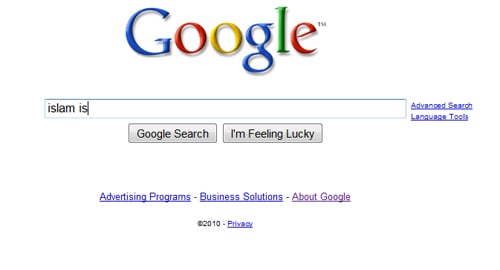 You can try this for other religion names ("hinduism", "taoism", etc). You will see that the suggestions list has been specifically censored by Google for only the Islam religion.
*************************************************
Why did McDonalds pander to Muslims and made such a pig-headed move in the first place? I believe this is because it thinks that "offending" Muslims can lead to more disastrous consequences than "offending" the Chinese or the Hindus (Hindus consider cows a sacred animal and do not eat beef. If McDonalds is truly sensitive to religion as it claims, it will not serve beef to not offend Hindus).
Look at the recent troubles in Malaysia, where 10 churches were vandalised, fire-bombed, and burnt, over a legal ruling on the word "Allah". Instead of settling the dispute calmly and civilly in the law arena, deeds almost amounting to terrorism were acted upon by some Muslims, who were clearly offended by the legal ruling which seemed to favour the Christians and unfavourably to the Muslims.
Indeed, in the past few weeks, we hear of:
- an American Muslim army major who killed 13 people and wounded 30 others in his own army camp, in the name of Islam
(
You can try this for other religion names ("hinduism", "taoism", etc). You will see that the suggestions list has been specifically censored by Google for only the Islam religion.
*************************************************
Why did McDonalds pander to Muslims and made such a pig-headed move in the first place? I believe this is because it thinks that "offending" Muslims can lead to more disastrous consequences than "offending" the Chinese or the Hindus (Hindus consider cows a sacred animal and do not eat beef. If McDonalds is truly sensitive to religion as it claims, it will not serve beef to not offend Hindus).
Look at the recent troubles in Malaysia, where 10 churches were vandalised, fire-bombed, and burnt, over a legal ruling on the word "Allah". Instead of settling the dispute calmly and civilly in the law arena, deeds almost amounting to terrorism were acted upon by some Muslims, who were clearly offended by the legal ruling which seemed to favour the Christians and unfavourably to the Muslims.
Indeed, in the past few weeks, we hear of:
- an American Muslim army major who killed 13 people and wounded 30 others in his own army camp, in the name of Islam
(